biweekly budget
Biweekly Budget: A Paycheck-First Plan That Works
Transform your finances with a paycheck-first biweekly budget. Assign bills, automate savings, and manage each paycheck effectively!

If you get paid every two weeks, the most effective move you can make this payday is a paycheck-first biweekly budget: assign every bill to either Paycheck A or Paycheck B, automate your savings transfer the moment your deposit lands, keep a small checking buffer, and give every third paycheck a standing job before it arrives. That single framework covers the 26 paychecks you receive each year, including the two bonus months when a third one shows up.
Here is your next-payday checklist:
- Capture your net pay for this specific paycheck (not an average, not a monthly estimate).
- List every bill with its due date, then assign each one to the paycheck that lands closest before it.
- Automate a savings transfer for the same day your deposit hits, even if it starts at $25.
- Set a checking buffer of $500–$1,000 that you treat as off-limits for spending.
- Note your next pay date and confirm which bills fall in that window.
- Flag any upcoming third-paycheck month and decide now where that extra check goes.
Pro Tip: Set your savings transfer to trigger automatically within 24 hours of your deposit. Automation removes the decision entirely, and that is what makes the habit stick.
What a biweekly budget is (and how it differs from semi-monthly pay)
A biweekly budget is a spending and savings plan built around 14-day pay periods rather than calendar months. You plan what each individual paycheck covers, not what the month costs in total. That shift in framing is what makes it work.
The most common point of confusion: biweekly pay and semi-monthly pay are not the same thing.
- Biweekly: paid every 14 days, which produces 26 paychecks per year. Two months each year will have three paydays instead of two.
- Semi-monthly: paid twice per calendar month (typically the 1st and 15th), which produces exactly 24 paychecks per year. No bonus months, no third-paycheck planning needed.
That two-paycheck difference matters more than it sounds. If you multiply your biweekly paycheck by 2 to estimate monthly income, you are understating your actual annual earnings. The correct formula is paycheck × 26 ÷ 12, which equals roughly 2.167 times your per-check amount. On a $2,000 net paycheck, that gap is $334 per month in unaccounted income, money that often disappears without a plan.
Billing cycles add another wrinkle. Most landlords, lenders, and utilities bill monthly, so your biweekly income has to cover expenses that do not align neatly to your pay dates. Mapping bills to specific paychecks on a calendar is how you close that gap.

How to set up a biweekly budget you can start this payday
Bankrate’s biweekly setup guidance outlines a four-step framework: list income and expenses, map bills on a calendar, create two pay-period budgets, and monitor every period. Here is that process expanded into six concrete steps you can complete in under an hour.
-
Write down your net paycheck amount. Use the actual deposit figure, not your gross salary. If your pay varies, use a conservative recent average.
-
List every monthly bill with its due date. Include rent, loan payments, subscriptions, insurance, utilities, and any minimum debt payments.
-
Assign each bill to Paycheck A or Paycheck B. Put the bill on the paycheck that lands closest before its due date. Aim to balance the two periods so neither paycheck carries a disproportionate load.
-
Split variable categories per pay period. Groceries, gas, and dining out do not have fixed due dates, so divide your monthly target in half and assign each half to one pay period.
-
Automate savings and debt payments on each payday. Experian recommends a 20% savings rate as a starting guideline. Even half that, automated on day one of each pay period, outperforms any manual approach.
-
Build a checking buffer of $500–$1,000. This is not an emergency fund. It is a timing cushion that prevents overdrafts when a bill hits a day before your paycheck clears.
Sample bill assignment:
Most people can complete the initial setup in one sitting. By the end of your first pay period, you will know which paycheck is heavier and where to rebalance. By the third pay period, the system runs almost on its own.
Pro Tip: If a bill lands right between two paychecks and you are not sure which to assign it to, contact the biller and ask to shift the due date by a few days. Most utilities and lenders allow one free date change per year.
How to handle the two months each year when you get a third paycheck
Because biweekly pay produces 26 checks per year, two calendar months will include three paydays. Those months are not random. You can identify them at the start of the year by mapping your pay dates on a calendar and spotting the months where three Fridays (or whatever your payday is) fall within the same month.
The third paycheck is a planning opportunity, not a windfall. If you have not assigned it a job in advance, it tends to disappear into everyday spending without moving any financial needle. Discover’s budgeting guidance specifically recommends automating the transfer of extra-paycheck funds into savings or debt repayment so the benefit is captured without relying on willpower.
Here is a priority order for that extra check:
- Emergency fund first. If your FDIC-insured savings account holds less than three months of expenses, direct the full check there until it does.
- High-interest debt second. Credit card balances above 15% APR cost more than almost any investment earns. A single extra payment can meaningfully reduce total interest paid.
- Tax-advantaged accounts third. If you have room in your IRA or 401(k) contribution limits, the IRS provides current limits and guidance for routing extra income into retirement accounts.
- Annual or irregular bills fourth. Car registration, insurance premiums, and holiday spending all arrive once a year. Pre-funding them with a third paycheck removes the scramble.
- Planned reward last. A portion for something you genuinely want is not irresponsible. It is what keeps the system sustainable.
Two quick allocation examples:
- All-in on savings: 100% to emergency fund until you hit your three-month target, then reassign future third paychecks down the priority list.
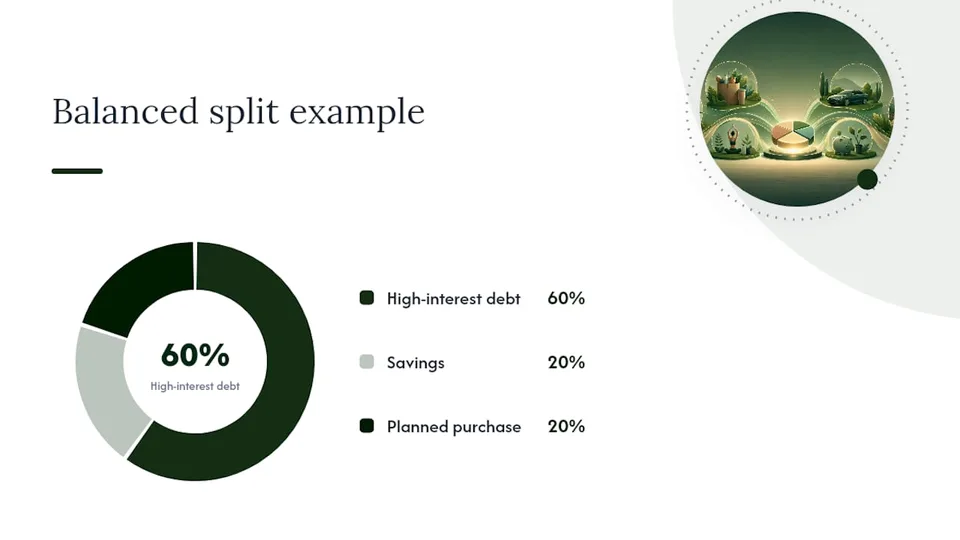
- Balanced split: 60% to high-interest debt, 20% to savings, 20% to a planned purchase or experience.
Templates and tools that fit a biweekly pay schedule
Two paths work well for setting up a biweekly budgeting system: a spreadsheet workflow or a paycheck-first app. Both can be running by your next payday.
The spreadsheet path gives you full control. A free biweekly budget planner in Excel or Google Sheets can assign bills to specific paychecks, track planned versus actual spending per period, and flag three-paycheck months automatically. Look for a template that includes per-paycheck rows (not monthly totals), a calendar column for due dates, a savings line that auto-calculates per period, and a toggle or note field for third-paycheck months.
The app path removes manual entry and adds automation. When evaluating any budgeting app for biweekly pay, the features that actually matter are:
- A paycheck calendar that lets you set your exact pay dates (not a generic monthly view)
- Bill assignment by pay period, not by calendar month
- Automated savings transfers triggered on payday
- A “safe to spend” daily estimate so you know what is available right now
- Manual entry or optional secure bank linking, depending on your privacy preference
Budgetmend is built specifically for this. It supports weekly, biweekly, and irregular income schedules, matches bills to the paycheck that covers them, and gives you a real-time safe-to-spend figure so you are never guessing mid-period. The free Starter tier gets you started with no commitment, and the Premium plan (available after a 14-day trial) adds receipt scanning, grocery price tracking, and Rescue Mode for recovering from overspend without judgment.
Pro Tip: Whether you use a spreadsheet or an app, set it up on the day your paycheck lands, not the day before. You need the actual deposit amount, not an estimate, to assign expenses accurately.
Practical tips and common mistakes to avoid on a biweekly schedule
The most common errors people make when switching to a biweekly system are easy to fix once you know what to look for.
Common mistakes and their fixes:
- Multiplying paycheck × 2 for monthly income. This understates your annual earnings. Use paycheck × 26 ÷ 12 instead.
- No checking buffer. Without $500–$1,000 sitting in checking, a single timing mismatch between a bill and a deposit can trigger an overdraft. Build the buffer before you optimize anything else.
- Saving only at month-end. Whatever is left at the end of the month is rarely what you planned to save. Automate a transfer on each payday and treat it like a bill.
- Ignoring third-paycheck months. Without a plan, that extra check merges into regular spending. Map your pay dates for the full year in January and mark the two bonus months now.
Rules of thumb that hold up in practice:
- Keep your checking buffer at $500–$1,000, separate from your emergency fund.
- Automate savings transfers within 24 hours of each deposit.
- Split variable spending categories (groceries, gas, dining) evenly across both pay periods.
- Review your budget every quarter, not just when something goes wrong.
Pro Tip: A quarterly review takes about 20 minutes. Pull up your last six pay periods, look for any category that ran over budget more than twice, and either adjust the allocation or address the spending pattern. Small corrections made early prevent large resets later.
How to track your progress each pay period and when to rework the plan
Tracking does not have to be complicated. A short two-point check at the start and end of each pay period is enough to keep the system accurate.
- On day 1 of each pay period: confirm your deposit amount, verify that automated transfers went through, and check that your buffer is intact.
- On day 13 (the day before your next paycheck): review actual spending against your per-period plan, note any category that ran over, and confirm no bills are due in the next 48 hours that you have not covered.
- If a category overspends two periods in a row: that is a signal the allocation is wrong, not that your willpower failed. Increase the budget for that category and reduce it somewhere else.
- If your income changes: recalculate using paycheck × 26 ÷ 12, reassign bills if needed, and adjust your savings transfer amount before the next deposit.
- If a large annual bill is approaching: shift it to the paycheck that has the lightest load that month, or pre-fund it from a third-paycheck allocation.
- If two or more categories overspend simultaneously: that usually means the checking buffer is too thin or a bill assignment needs to move to the other pay period. Rebalance before adding new spending categories.
The goal is a system that requires small, frequent adjustments rather than a full reset every few months. Most people find that after three or four pay periods, the plan stabilizes and the check-ins get shorter.
Why paycheck-first budgeting is the approach worth committing to
Most budgeting advice is built around a monthly framework that does not match how most people actually get paid. The paycheck-first approach works because it aligns your plan to your actual cash flow, not to an idealized monthly average. When you assign bills to specific paychecks and automate savings on each payday, you remove the two biggest failure points: timing mismatches and delayed savings decisions.
Budgetmend was built on exactly this premise. Its paycheck calendar, bill-matching features, and safe-to-spend estimates are designed for people whose income does not arrive in neat monthly installments. The optional secure bank linking keeps your data private while giving you real-time accuracy, and the free Starter tier means you can test the system without any financial commitment.
Budgetmend makes the paycheck-first system automatic
The hardest part of a biweekly budget is not the math. It is remembering to check, reassign, and transfer at the right moment every two weeks. Budgetmend handles that automatically.
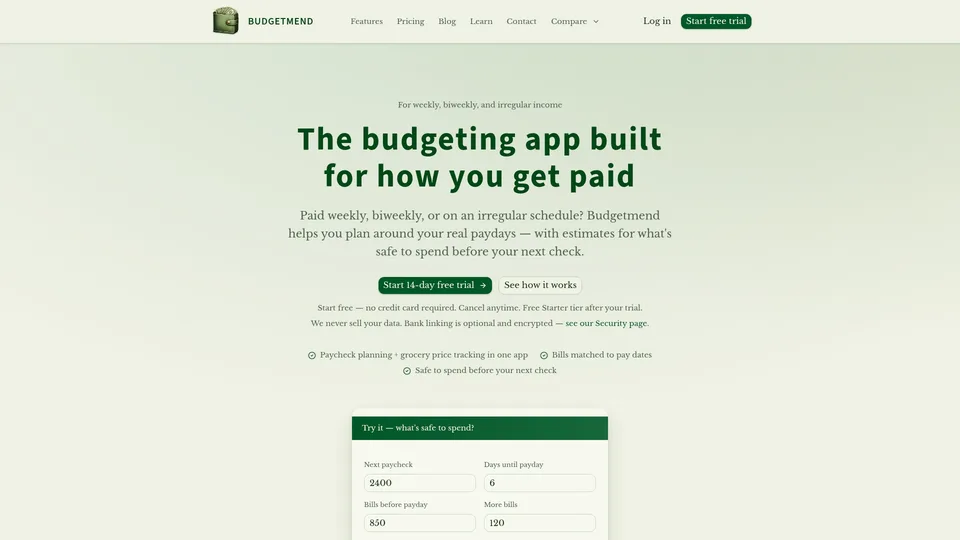
Set your pay dates, assign your recurring bills to the paycheck that covers them, and let the app calculate your safe-to-spend figure in real time. When a third-paycheck month arrives, Budgetmend flags it so you can direct that extra check intentionally. Receipt scanning and grocery price tracking keep variable spending honest without requiring manual entry after every purchase. Rescue Mode means an overspent week does not derail the whole plan.
Start with the free Starter tier at Budgetmend, set your pay dates on day one, assign your three biggest recurring bills, and automate one savings transfer. That is the entire first session. The system builds from there.
Sources
The following sources informed the methods, formulas, and recommendations in this article.
- How to budget for biweekly paychecks | Discover
- How To Create a Biweekly Budget In Just 4 Easy Steps | Bankrate
- Budgeting With Biweekly Pay: A Complete System (2026) | WealthVieu
- How to Create a Biweekly Budget
- Biweekly Budget Planner (Free Excel & Google Sheets Maker)
This article is general information, not a substitute for advice from a qualified financial advisor. Consult a qualified financial professional about your own circumstances before acting on anything here.
Educational disclaimer
Budgetmend provides budgeting tools and educational content for educational purposes only.
Budgetmend provides budgeting tools and educational content. We are not a bank, lender, tax advisor, or investment advisor.
Related articles
More practical guides to help you plan around your paycheck.